Download the public Windows release
The current public release is Profileo 1.3.9, published on 19 September 2026. This download comes from the official Profileo GitHub repository.
Download Profileo 1.3.9 for Windows
You can also inspect the release and its downloadable files before installing. The public installer is for Windows 10 and Windows 11 on x64 computers. Public macOS and Linux installers are not currently offered here.
New in Profileo 1.3.9
- Refreshed single, multiple and quick profile creation.
- Modern Settings, Account and Billing screens.
- Dedicated Chrome, Brave, Opera, Edge and Yandex browser runtimes.
- Android device profiles with first-run setup when compatible components are missing.
Android setup requires an additional download, acceptance of the Android SDK license, sufficient disk space and compatible virtualization. Desktop browser runtimes are included in the Windows installer.
Install and open Profileo
- Download the installer using the button above and save it to your computer.
- Open the installer and review the publisher and installation information shown by Windows. If a security tool reports a problem, stop and contact support rather than disabling protection.
- Choose the installation folder when prompted, finish installation and open Profileo.
- Sign in with your Profileo account. Check your subscription before creating browser profiles.
Downloading the application is free. Creating and managing profiles requires an active plan; compare the current limits on the pricing page.
Create your account
Choose Create Account in the sign-in window. Enter your email, name and password, then complete email verification with the code sent to your inbox. You can also use the Google sign-in option when available.
If an email code does not arrive, check spam and confirm that the address was typed correctly. Use the resend option after its timer finishes. For an existing account, use the password-reset link rather than creating a duplicate account.
Find your way around the dashboard
Use the profile list to open and stop browser sessions. The proxy manager stores connection details, while Automation lists scripts and their run status. Account settings and billing are separate from individual profile settings.
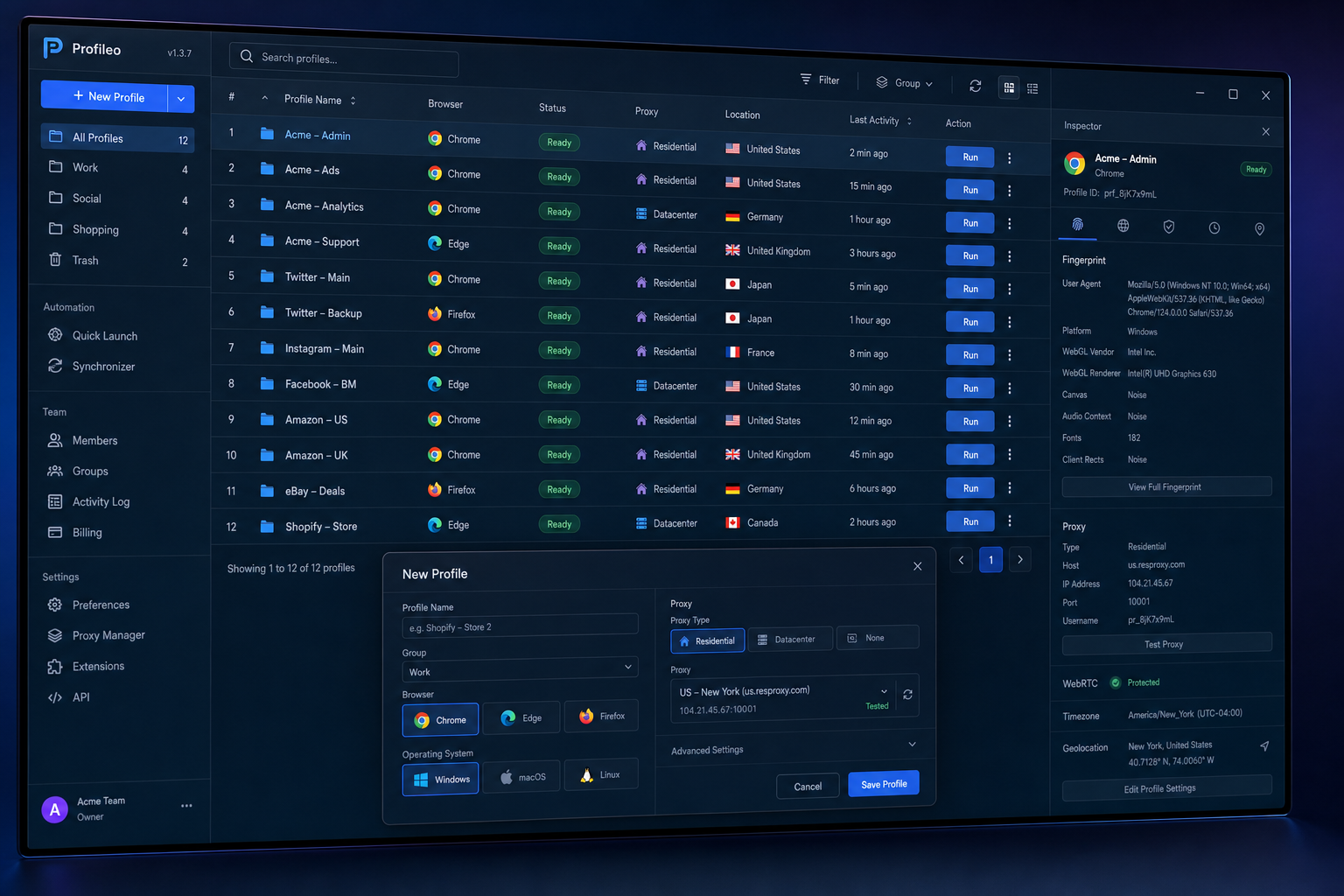
Your next step is to create one browser profile, choose the appropriate proxy if needed, and test it before signing in to a work account.
Which version should I use?
Use the public download above for Profileo 1.3.9. Existing users can click the update button in the app to check for the new version. Close active profiles before installing an update.
For installation problems, contact [email protected] with the Windows version, Profileo version and exact error message. Do not send passwords, verification codes or proxy credentials.